

Connect Docs articles with tasks
While working on a Docs article, you can create and manage tasks directly from the article. This makes it easy to turn required updates, reviews, or other internal work into actionable tasks while keeping them connected to the relevant documentation.
This is especially useful for keeping your knowledge base up to date. If you notice outdated information, missing content, or an article that needs improvement, you can create a task directly from the article and assign it to a team member.
The connection between the task and the Docs article remains visible, making it easy to track what needs to be done and why.
Create a task from a Docs article
When editing a Docs article, you will find the Tasks section in the sidebar on the right.
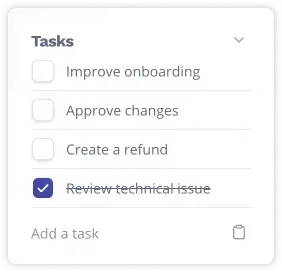
From here, you can:
create a new task
search for and link an existing task
create a task from a template
When you create a new task from an article, it is automatically linked to that Docs article. You can then open the task and add further details, such as:
Description
Assignee
Status
Priority
Due date
Subtasks
Comments
Tags
This allows your team to coordinate the required work internally while keeping it connected to the original Docs article.
Create a task from a template
For recurring workflows, you can also create a task directly from a task template.
This is particularly useful when articles need to be reviewed regularly or updated according to a defined process. Information stored in the template, such as the description, subtasks, assignee, or relative due date, is automatically applied to the new task.
Note:
Task templates are only available in the Business Plan.
Link an existing task to a Docs article
You do not need to create a new task every time. You can also search for an existing task and link it to the current Docs article.
This is especially useful when a single task involves multiple articles. For example, a task for updating product documentation can be linked to all Docs articles that need to be reviewed or updated.
View linked Docs articles in a task
The connection works both ways. When you open a task, the Docs tab shows all Docs articles linked to that task.
From there, you can preview an article or open it directly in HelpSpace. This makes it easy to see which documentation is related to the task without having to search for it separately.
Benefits of connecting Tasks and Docs
Connecting Tasks with Docs helps you make knowledge base maintenance part of your team's regular workflow.
You can create tasks exactly where the need for an update is identified, assign responsibilities, and track progress until the work is completed. Multiple articles can be connected to the same task, while task templates can help standardize recurring documentation workflows.
Instead of simply noticing that an article needs to be updated, you can turn it into a clear, trackable task. This helps your team keep documentation accurate, organized, and up to date.
